A broken affiliate link is a silent leak. The page still loads, the button still looks clickable, and your analytics still show traffic — but the commission never lands because the destination 404s, redirects to a homepage, or points at a program you were quietly dropped from. This guide walks through every reliable way to find broken affiliate links, from a five-minute manual spot check to continuous automated monitoring, with a worked example so you can see exactly where the failure hides.
The scale is easy to underestimate precisely because nothing on your side breaks. One retired product page can sit behind links in a two-year-old review, a best-of roundup, a comparison table, your newsletter archive, and a pinned social post — every one of them still returning a clean 200 OK to you, and every one of them earning nothing. Worse, the pages most likely to hold stale links are your oldest ones, which are usually the ones with the most accumulated search traffic. Finding these is not a matter of scanning your site for errors; your site has no errors. It is a matter of checking where each link actually lands. (For the market-level picture — how much revenue rides on affiliate links, and how quickly the web they point into decays — see the complete guide to affiliate link monitoring.)
Why do affiliate links break without anyone noticing?
Unlike a broken image or a dead internal link, a broken affiliate link usually renders perfectly. The failure happens downstream — after the click, inside a redirect chain you never see. A visitor clicks, bounces through your cloaker, the network's tracker, and the merchant's own redirects, and only the final hop decides whether you get paid. Because your page returned 200 OK, nothing on your side looks wrong. That is why publishers can lose revenue for weeks before they notice a dip, and often only trace the cause after digging through a network dashboard. The link that broke was never visibly broken — it was broken three redirects deep, somewhere you would only look if something told you to. Finding these leaks means checking the destination a real click reaches, not the URL you pasted into your CMS.
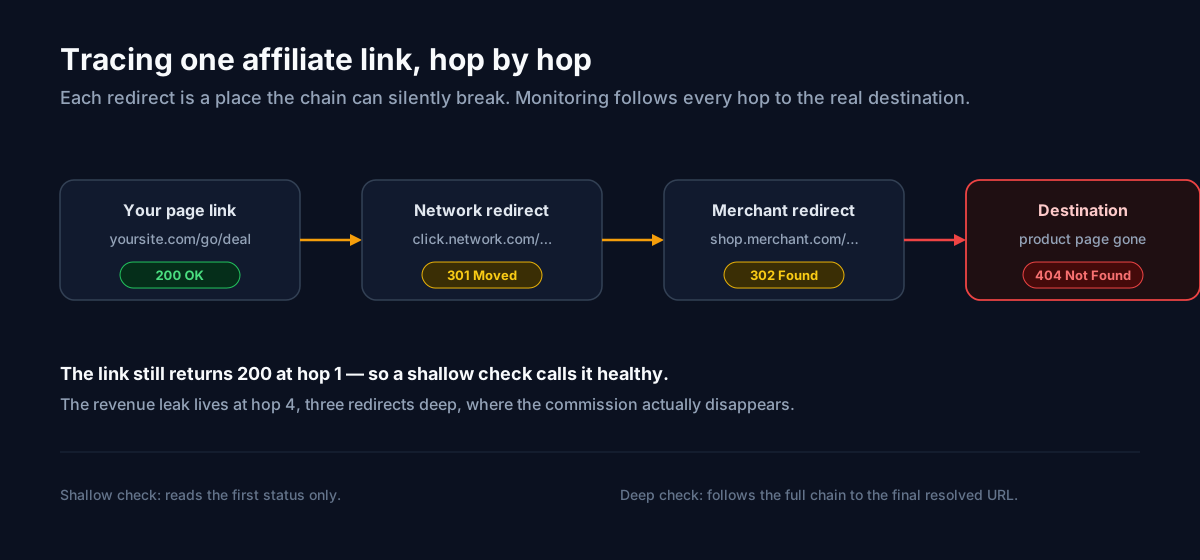
What does a broken affiliate link actually look like?
Consider a real-shaped example. You publish yoursite.com/go/deal, a cloaked link. Here is the chain a checker follows:
yoursite.com/go/deal→ 200, then a301to the network.click.network.com/…→ 301 to the merchant.shop.merchant.com/r/…→ 302 to the product page.shop.merchant.com/p/discontinued-item→ 404.
Your page is healthy. Hop one is healthy. The link only fails at hop four, where the product was retired. A tool that reads the first status sees 200 and moves on; the commission is already gone. The most common failure modes all share this shape — the break is downstream of what you can see:
- The merchant took the product page down (a hard
404or410). - The affiliate program ended or removed you, so the deep link now redirects to a
generic homepage with your tag stripped.
- A redirect in the chain broke, so the tracking parameter never reaches the
network.
- The link was edited by mistake — a truncated URL or a missing affiliate tag.
If you want the full taxonomy of causes and the signature each one leaves, our companion post on why affiliate links break breaks down all five in detail.
How do you find broken affiliate links by hand?
The manual spot check is where everyone starts, and for a small site it is genuinely enough. Pull your highest-earning pages, open each affiliate link in a private or incognito window so no cached login skews the result, and watch where it truly lands. Confirm three things: the final destination is the specific product you intended, the URL still carries your affiliate tag or subid, and you were not silently redirected to a homepage or search page. Note the final URL so you have a known-good baseline to compare against next time. This works well until you pass a dozen or so links — then it becomes the chore you never quite get to, and, critically, it only tells you about the single moment you happened to look. A link that passes your Monday check can break on Tuesday and you will not know until the next manual pass, which is exactly the gap breakage lives in.
Can a generic broken-link crawler catch them?
Site crawlers and SEO auditors flag URLs that return an error status, and they are useful for catching outright 404s across a large site quickly. But they have two blind spots that matter enormously for affiliate work. First, most do not follow the full redirect chain the way a real click does — they check the first response and stop, so the 404 at hop four in the example above never surfaces. Second, they cannot tell that a 200 OK homepage is actually a failure: when a dead deep link collapses to the merchant's front page, a generic crawler sees a healthy 200 and reports no problem, even though your commission evaporated. Crawlers also run when you trigger them, not continuously, so they share the manual check's timing gap. They are a reasonable net for structural site errors and a poor net for affiliate-specific breakage.
What should automated affiliate-link monitoring do differently?
The only approach that catches breakage *first* is monitoring that runs on a schedule and understands affiliate redirects. This is what Affilert is built for: it checks every link across every network on a recurring schedule, follows each redirect to the real destination, and alerts you the moment a link breaks, a program disables you, or a tag goes missing — before it costs you another day of sales. The distinction from a crawler is not just automation; it is what gets evaluated. Effective monitoring is redirect-aware (it judges the final resolved URL, not hop one), tag-aware (it confirms your tracking parameters survived every hop), and cross-network (Amazon Associates, CJ, Impact, and ShareASale in one inventory instead of a separate login per program). It also treats a link that newly lands on a homepage as a failure even when the status is 200, which is precisely the case crawlers miss.
Here is how the three approaches compare on the things that decide whether you catch a leak in time:
| Capability | Manual spot check | Generic crawler | Redirect-aware monitoring |
|---|---|---|---|
| Runs continuously | No | Only when triggered | Yes, on a schedule |
| Follows the full redirect chain | If you watch closely | Rarely | Yes |
Flags a 200 homepage as a failure | Sometimes | No | Yes |
| Verifies the affiliate tag survived | Manually | No | Yes |
| Covers every network in one place | No | Partially | Yes |
| Scales past a few dozen links | No | Yes | Yes |
How often should you actually be checking?
Cadence is the lever most publishers get wrong. Breakage happens continuously, so a check that runs once a month leaves a month-long window in which a dead link earns you nothing. The practical answer is to check on a schedule and weight it by value: verify your highest-earning links frequently and your long-tail links less often, so you spend crawl effort where the revenue is. The goal is to shrink the interval between "a link broke" and "you found out" from weeks to minutes. When a check does find a break, you also want the fix loop to be tight — repair at the source, then let the next scheduled check confirm the link is healthy again rather than re-verifying by hand. For the mechanics of what each check evaluates, see how healthchecks work; for the repair side, our fixing broken links checklist covers the common cases. If you route readers onward, note that Google asks you to mark affiliate links with `rel="sponsored"`, which is worth auditing at the same time.
Frequently asked questions
How can I tell a broken affiliate link from a working one if the page still loads?
Check the final destination, not the page you published. Open the link, follow it all the way through, and confirm two things: it lands on the specific product (not a homepage, search page, or "currently unavailable" notice) and the resolved URL still contains your affiliate tag. A link that returns 200 but drops you on a generic page, or strips your tag along the way, is broken for your purposes even though a browser shows no error.
Do broken affiliate links hurt my SEO as well as my revenue?
They can. Outbound links to dead pages degrade the experience for readers and crawlers alike, and a page full of redirects to nowhere is a weak signal. Beyond that, the direct cost is revenue: the click still happens, but the commission does not. Fixing broken links protects both, which is why continuous monitoring pays off twice.
What is the fastest way to start finding broken links today?
Inventory your top ten earning pages and manually verify every affiliate link on them this week. That immediately catches your highest-value leaks. Then set up automated, redirect-aware monitoring so the same check runs on every link, on a schedule, without you remembering to do it.
Where to start this week
Manual checks and generic crawlers will find some broken links, but they find them late and miss the affiliate-specific failures that matter most. Start small and compound: verify your top earners by hand now, then hand the recurring job to redirect-aware monitoring so a break reaches you as an alert instead of as a line in next month's payout report. If Amazon is a big part of your mix, the failure modes there are distinct enough to warrant their own playbook — our Amazon Associates link-checker guide covers stripped tags and disabled accounts specifically. And when you are ready to put every network on autopilot, the complete affiliate link monitoring guide walks through the full setup.