If your income depends on affiliate links, those links are infrastructure — and infrastructure needs monitoring. Yet most publishers treat link health as something to check manually, if at all. The stakes are not small: U.S. affiliate marketing spend reached roughly $9.6 billion in 2023 and is projected near $12 billion in 2025 (Statista), and every dollar of it rides on links that can fail without warning. A 2024 Pew Research Center analysis of nearly a million web pages put a number on how quickly the destinations decay: 38% of pages that existed in 2013 were no longer accessible a decade later, and even 8% of pages created in 2023 had already become inaccessible within a year. Link rot is not a slow, distant problem; it is an ambient one, and it is the reason this page is the reference the other guides on this site point back to for the numbers. This guide covers affiliate link monitoring end to end: what to monitor, how often, which alerts are worth acting on, and how to automate the whole thing.
What does affiliate link monitoring actually mean?
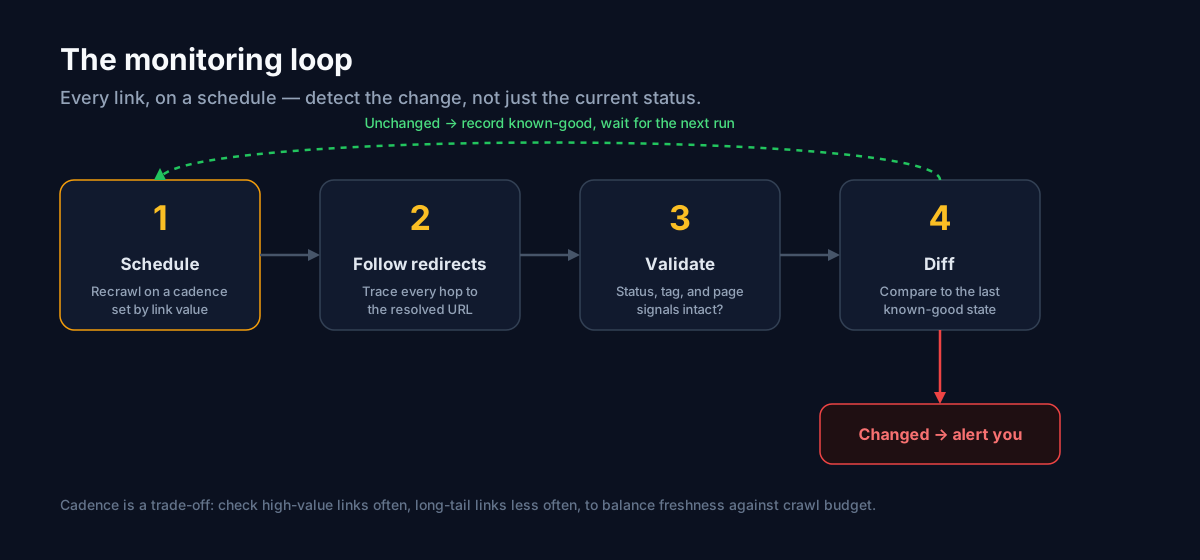
Monitoring is not a one-time audit. It is the continuous practice of verifying that every affiliate link still does what you expect: resolves to the right destination, keeps its tracking parameters, and earns the commission it is supposed to. The distinction matters because an audit answers "were my links healthy when I checked?" while monitoring answers "is every one of my links healthy right now, and tell me the moment that changes?" The difference is a window of exposure. An audit leaves you blind between passes; monitoring closes that gap by re-checking on a schedule and comparing each result against the last known-good state, so a link that breaks on a random Tuesday becomes an alert on Tuesday rather than a mystery in next month's payout. Think of it the way you think about server uptime: nobody checks whether their site is up by loading it by hand a few times a week.
What should you monitor on every affiliate link?
A useful check looks at five things, in order of how directly each maps to lost revenue. First, the HTTP status of the final destination — a live 200, or a 404, 410, or 5xx. Second, the full redirect chain, every hop from the first URL to where the click truly lands, because a healthy first hop tells you nothing about the fourth. Third, the tracking parameters — did your tag, subid, or affiliate ID survive to the end, or did a redirect quietly drop it? Fourth, destination drift — a link that used to land on a product but now lands on a homepage or search page is broken even at 200. Fifth, program status — the pattern of failures that signals a network silently disabled you. Together these catch the whole spectrum, from a hard 404 to the subtle 200-but-wrong failures that generic tools miss entirely. Our post on why affiliate links break maps each of these signals to its underlying cause.
How often should you check?
Manual checks happen when you remember; breakage happens when you do not. The right cadence is continuous — links re-checked on a schedule around the clock — but not uniform. Checking a thousand long-tail links as often as your ten top earners wastes crawl effort where little revenue is at stake. Weight frequency by value instead:
| Link tier | Example | Suggested cadence |
|---|---|---|
| Top earners | Your best-converting product links | Several times a day |
| Mid-tier | Steady but modest earners | Daily |
| Long tail | Older posts, low-traffic links | Weekly |
| Seasonal | Deal and holiday links | Hourly while live |
The goal across every tier is the same: shrink the window between "a link broke" and "you found out" from weeks to minutes. Seasonal links deserve special mention because their value is time-boxed — a broken Black Friday link is worthless by Saturday, and on Amazon the 24-hour cookie window means there is no recovery on a click that never converted.
Which alerts actually matter?
Alert fatigue kills monitoring — a stream nobody reads is worse than no stream, because it breeds false confidence. Focus alerts on the four signals tied to lost revenue: a previously healthy link starts failing; a destination changes to a homepage or fallback page; a tracking parameter goes missing; or a pattern of failures appears across one network, which usually means an account issue. Route these to a channel you actually watch — email or a webhook into your team's tooling — so a break becomes an action item, not a buried log line. A good alert is specific enough to act on without opening a dashboard. Here is the shape of a webhook payload worth receiving:
{
  "event": "link.broken",
  "link_id": "lnk_9f2a",
  "source": "yoursite.com/best-blenders",
  "network": "amazon",
  "final_url": "https://www.amazon.com/s?k=blender",
  "expected": "product page with tag=you-20",
  "failure": "redirected_to_search",
  "tag_present": false,
  "detected_at": "2026-07-24T14:08:00Z"
}
Everything you need to triage — which link, on which page, what it did instead of working, and whether your tag survived — is in the payload, so the alert is actionable on its own.
Manual vs. automated monitoring
You can monitor manually with a spreadsheet and a lot of discipline, but it does not scale and it never runs while you sleep. The hidden failure of manual monitoring is not that it misses links — it is that the spreadsheet drifts out of sync with reality without anyone noticing. New links get published and never added to the sheet. Old links get checked, marked green, and then break the following week while the sheet still says green. The document becomes a record of the last time someone had time to look, not the state of your links now — and it reads as reassurance precisely when it is most out of date. Automation removes the human memory step entirely: every link that exists is in the inventory because it was imported from the source, and every status is current because it was re-checked on a schedule rather than the last time a person got around to it. That is the whole point — continuous, redirect-aware, and cross-network at once, with no discipline required to keep it honest. For a broader walkthrough of the manual, crawler, and automated approaches side by side, see how to find broken affiliate links; for a deeper comparison against generic crawlers, CMS plugins, and analytics tools, see our alternatives page. One more housekeeping note while you are auditing links: Google asks publishers to mark affiliate links with `rel="sponsored"`, so a monitoring pass is a natural time to confirm that attribute is in place too.
How do you set up automated monitoring?
- Connect your sources — import links from every site, sheet, or feed into one
inventory, so nothing depends on which CMS a link lives in.
- Let checks run on a schedule — every link is re-verified automatically and
every redirect followed to the real destination.
- Configure alerts — send failures to email or a webhook, weighted so top
earners escalate faster than the long tail.
- Act and confirm — fix at the source and let the next check verify the repair
instead of re-checking by hand.
New to the product? Start with our getting started guide, or read how healthchecks work for the mechanics of a single check.
Frequently asked questions
How is affiliate link monitoring different from uptime monitoring?
Uptime monitoring asks whether a server responds; affiliate link monitoring asks whether a *specific link still earns*. A page can be up (200 OK) while the affiliate link on it is broken — the product is out of stock, the tag was stripped, or the deep link now redirects to a homepage. Monitoring has to inspect the resolved destination and its parameters, not just whether something answered.
Can I monitor affiliate links across several networks at once?
Yes, and you should. Managing a separate audit per network — Amazon here, CJ and Impact there — leaves you with a partial view and no single answer to "what is broken right now?" Cross-network monitoring puts every program in one inventory with one alert stream, which is the only way the picture stays complete as you add networks.
What happens after monitoring flags a broken link?
You fix it at the source — swap the ASIN, restore the tag, or replace the product — and the next scheduled check confirms the link is healthy again. Good tooling closes that loop for you, so "broken" moves to "resolved" automatically rather than requiring a manual re-verification.
Set it up once
Affiliate links are revenue infrastructure, and infrastructure that is not monitored fails silently. Decide your cadence by link value, point your alerts at a channel you actually read, and let a redirect-aware, cross-network system carry the recurring load. Set it up once and you trade unpredictable revenue dips for a simple, specific alert the moment something breaks. Start free — no card required.