Amazon Associates is where most affiliate publishers start, and it is also where broken links hide most effectively. Products go out of stock, ASINs get merged or retired, and a single account issue can quietly strip your tag from every link on your site. What makes Amazon especially unforgiving is the economics of the program: Amazon Associates runs on a 24-hour cookie window — attribution generally applies only to purchases made within 24 hours of the click (with a longer window for items added to cart during that period), per Amazon's Associates Program Operating Agreement. There is no second chance on a broken link — if the click does not convert inside that day, that commission is simply gone. This is a practical guide to checking Amazon Associates links at scale so a dead link never earns Amazon a sale you should have been paid for.
The exposure is also unusually concentrated. For most publishers Amazon is not one program among several — it is the program, sitting behind every product roundup, every comparison table, and every "check the price" button in the archive. That concentration cuts both ways: a tag that stops being applied, or an account flagged for review, does not degrade one page's earnings, it flattens the whole catalogue at once. And unlike a merchant with a 30-day cookie, there is nothing to reclaim afterwards — every click that lands during a broken window expires inside a day. An Amazon-heavy site therefore needs checking on the cadence of a running system rather than a filing cabinet. (For the wider market picture and the pace of link rot generally, see the complete guide to affiliate link monitoring.)
What actually breaks in an Amazon link?
An Amazon affiliate link can fail in ways that are invisible on the page, and the frustrating part is that most of them still return a healthy 200 OK. The storefront is engineered never to look broken. There are four failure modes worth knowing by name, because each leaves a different signature and needs a different check to catch:
- Out-of-stock or discontinued products — the listing still resolves, but the
buy box is gone and conversion craters; some links quietly redirect to search or a category page.
- Retired or merged ASINs — the deep link 404s or bounces to a "currently
unavailable" page.
- Stripped or wrong tag — an edit, a plugin, or a redirect drops your
tag=
parameter, so clicks convert with no attribution to you.
- Account-level issues — if your account is flagged or on hold, links can stop
attributing across your entire catalog at once.
The diagram below shows why a single "is it up?" check is not enough: only two of these four surface as an HTTP error at all.
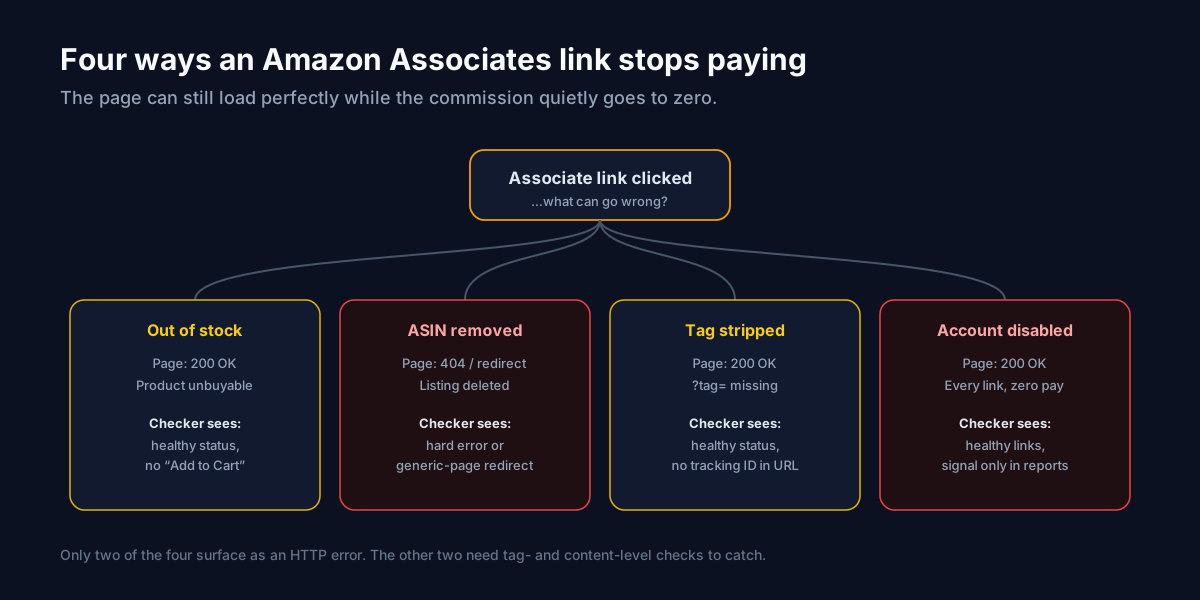
Why do Amazon links stop paying while the page still loads?
Because the thing that pays you is not the page — it is the tag= parameter and a buyable product, and Amazon can remove either without touching the URL you published. When a product goes out of stock, amazon.com/dp/ASIN?tag=you-20 still returns 200; the page renders, but there is no "Add to Cart", so no purchase and no commission. When a plugin or a redirect strips your tag, the page is equally healthy — the visitor buys, Amazon records the sale, and your ID simply is not attached to it. When your account is placed on hold, every link on your site keeps returning 200 while none of them attribute. This is the core reason a generic uptime or broken-link checker is the wrong tool for Amazon: it confirms the page is up, which was never the question. The question is whether *this specific link* still leads to a buyable product with *your* tag intact — a content- and parameter-level check, not a status check.
How each failure looks to a checker — and how to fix it
The reason Amazon deserves a dedicated approach is that the four failure modes demand different detection. Mapping them out makes the checker requirements obvious:
| Failure mode | HTTP status | What a checker must notice | The fix |
|---|---|---|---|
| Out of stock | 200 OK | No buy box / availability text changed | Swap ASIN or replace the product |
| ASIN removed | 404 or redirect | Hard error or bounce to a generic page | Relink to the current listing |
| Tag stripped | 200 OK | tag= missing from the resolved URL | Restore the tag at the source |
| Account disabled | 200 OK | Broad, site-wide attribution loss | Resolve the account issue with Amazon |
Two of the four never produce an error status, which is exactly why "the link works" is a dangerous standard. A checker that only reads status codes will pass a stripped-tag link forever. You need one that inspects the final URL and its parameters, not just whether a page returned 200 OK.
Checking a few Amazon links by hand
For a small site, a manual pass is realistic. Open each link in a private window and confirm three things in order: the product is genuinely in stock and buyable, the resolved URL still contains your tag=, and you were not redirected to a generic search or category page. Keep a short list of your known-good final URLs so a future check has something to compare against. Here is a worked example of the failure that fools everyone: you inspect amazon.com/dp/B0XXXX?tag=you-20, the page loads perfectly, the product is in stock — but you notice the address bar now reads amazon.com/dp/B0XXXX with no tag. A caching plugin rewrote the URL on publish. Nothing looked broken; every sale from that link had been going to Amazon unattributed. Manual checks catch this only if you specifically look at the parameter, and only on the day you look — which is why the method stops scaling past a dozen or so links.
How do you check Amazon Associates links at scale?
At scale you want an Amazon Associates link checker that runs continuously. Affilert imports your links, re-checks them on a schedule, follows each redirect to the real destination, and flags the moment a link stops behaving — an out-of-stock bounce, a missing tag, or a broad attribution failure that hints at an account problem. Instead of auditing your catalog by hand, you get an alert the day something changes, while you can still swap the product inside Amazon's 24-hour window on future clicks. The same tag-level awareness that catches a stripped tag= is what a generic crawler fundamentally cannot do, because to the crawler the page is simply up. Amazon is also rarely the only network a serious publisher uses, so checking it in isolation is only half the job. Monitoring every program in one place — Amazon alongside CJ, Impact, and the rest — means one dashboard and one alert stream instead of a separate login and spreadsheet per network. See how that compares to point tools on our alternatives page.
A repeatable Amazon link audit
- Import your Amazon links from every site and page into one inventory.
- Schedule automatic re-checks so stock changes and tag drops surface on their
own.
- Alert on failures via email or webhook so you can react in minutes, not weeks.
- Fix the link — swap the ASIN, restore the tag, or replace the product — and let
the next check confirm the fix.
For the underlying mechanics, how healthchecks work explains what each check evaluates, and the fixing broken links checklist covers the repairs above step by step.
Frequently asked questions
Does Amazon penalize me for having broken affiliate links?
Amazon's bigger concern is the reverse — links pointing at products you do not have permission to promote, or non-compliant link formats — but broken links still cost you directly through lost commissions. The Associates Program Operating Agreement sets the rules your links must follow; keeping links live and correctly tagged keeps you both compliant and paid.
Why did my Amazon links stop earning even though nothing on my site changed?
The change was almost certainly on Amazon's side: a product went out of stock, an ASIN was retired, or — the one to rule out first — your account was placed on hold, which silences attribution across every link at once. Because none of these alter your pages, only a check that inspects the live destination and your tag will surface the cause.
How often should I check Amazon links specifically?
More often than most networks, because Amazon's catalog churns constantly and the 24-hour cookie means a broken link has no recovery window. Check your highest-earning Amazon links frequently and the long tail on a slower cadence, and automate it so stock and tag changes are caught the day they happen.
Put your Amazon audit on autopilot
Amazon Associates links break quietly, and the storefront always looks fine — two of the four ways they fail never even return an error. A continuous, tag-aware link checker turns a monthly manual audit into an automatic safety net, so you find the dead ASIN or the stripped tag before your payout report does. If you want the cross-network view of every way links fail, start with how to find broken affiliate links, then build the recurring system with the complete monitoring guide. Ready to try it? Start free, no card required.